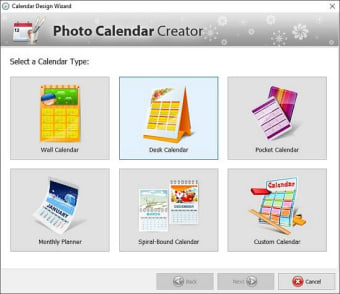
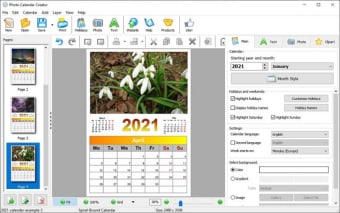
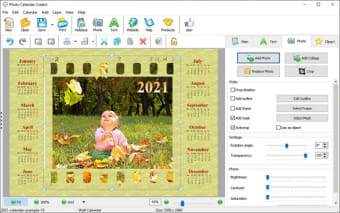
The software offers various templates so that you can design wall, desk, pocket, monthly, yearly, and custom calendars. You can set the layout of the elements on your calendar, add images, text, and clipart, as well as insert public holidays for each year, lunar phases, or any other events or occasion of your choice.
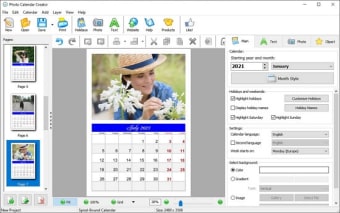
Create professional photo calendars for a month or a year from more than 100 templates designed in a variety of styles. The user can customize the calendar, add any number of photos, create custom groups of holidays and make calendars in any language. Save your calendar as image and print at home or in a printing house. A personal calendar is not only an outstanding gift for friends and relatives, but it is also an excellent promotional product!
Create calendars for any year, month or quarter
Enjoy different options for calendar grid placement
Choose from over 100 calendar designs and layout templates
Customize events and holidays
Select the font and color for calendar headings as well as month and day names
Add photos either in the background or on top of text
Create lunar calendars in various formats
Export your work into Photoshop for professional touchups
Be amazed by the high quality of your printed photo calendars
Photo Calendar Creator is made for both home and business users. For home users: it allows to Produce gift photo calendars, add any number of photos, print without worries on your inkjet or laser printer, create desktop calendars for your PC.
A wide choice of calendar templates
Great abilities to customize the calendar
User-friendly interface
Saving calendars in CMYK for professional printing
Great software for home use. I just love making calendars with my pictures. They make great gifts for friends and family. Pros: easy app for noobies Cons: haven't had any troubles with the app so far
Anonymous user
Great software for home use. I just love making calendars with my pictures. They make great gifts for friends and family. Pros: easy app for noobies Cons: haven't had any troubles with the app so far
Anonymous user
Fun to use. I decided to get this software after stumbling upon some smashing calendars on pinterest. Since then, I've never bought a single calendar! Maybe there're few cliparts, but I had no trouble adding my own pictures and changing the existing templates. All in all, the software didn't put a stopper on my creative spree, that definitely counts. Pros: base of public holidayslots of calendar types Cons: non-compatible with iOS
Anonymous user
Unhappy. I would never have downloaded this and wasted hours of time on a calendar that can't be saved or printed, if you said something on the webpage. I am very disapointed and frusterated.
Laws concerning the use of this software vary from country to country. We do not encourage or condone the use of this program if it is in violation of these laws. Softonic may receive a referral fee if you click or buy any of the products featured here.










.png)